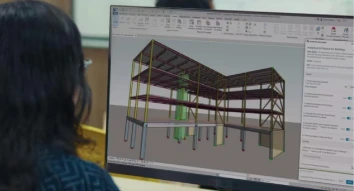
Our Revit Architecture course in Dubai teaches you to create 3D models,
2D drawings, and documents using Revit Architecture. Designed for professional
architects, designers, engineers, technicians, and contractors, MEP Dubai’s Revit
architecture training online will elevate your skills and enhance your career. Enroll in
the Revit architectural course today to improve your designing skills.
1024
+ Reviews
Overview of
Revit Architecture Course
Revit architecture is a software that enables architects to create detailed drawings
with more precision. Revit architecture classes help trainees learn about the
software's key features and use its advanced tools to create parametric components
and develop building models efficiently. They also learn how to design, model,
visualize, and coordinate architectural projects. What will you learn?
Our Autodesk Revit architecture course focuses on
Revit Architecture basics to advanced
Revit families
3D modeling with Revit Architecture
2D drafting with Revit Architecture
Construction documentation
Revit Architecture Software Features Covered:
Parametric modeling
Collaboration tools
Clash detection
Visualization and rendering
Energy analysis
Autodesk Revit Architecture Course Syllabus
Revit Course Architecture syllabus includes the following:
Understand the basic features and the
history of Revit Architecture, and the installation
procedure of the software
Explore the user interface and learn about
the various file types of Revit.
Learn the standard terminology of the
software and view the commands
Study the structural and architectural
elements and their creation
Know how to select the appropriate template,
define levels and grids, and set up project
units
Find out how to set up object styles and how
to create and manage worksets.
Learn about creating custom templates and
families. Study how to load, modify, and manage
them
Understand file formats and how to use cloud
collaboration tools for worksharing
Study the basics of how to generate sheets
and layouts, and about project
documentation
Have an overview of Revit’s editing tools
and the editing commands such as move, copy, rotate,
mirror, align, array, and offset
Know in detail the advanced modification
tools such as multiple elements, scale, stretch,
split, join, trim, extend, etc.
Understand how to work with constraints and
edit families and components
Learn how to edit, undo, and redo history
and ensure efficient design workflow
Practical training in using editing
tools
Know how to create levels and add them in
elevation views
Understand the modification of level heights
and adjust level extents
Study the creation of grids and the setting
up of grid spacing, and how to modify grid
lines
Learn the usage of the align tool to align
and adjust levels and grids. Learn about copying,
mirroring, and locking levels and
grids.
Find out the best practices for setting up
levels and grids and troubleshooting
errors
Have an overview of the door and window
families. Know in detail about the system and the
loadable families
Learn how to make changes in the type of
doors and windows. Also learn about adjusting size,
frame, and materials
Understand ‘Family Editor’ tool and the
creation of custom door and window families using
the tool
Find out how to work with tags and
schedules, and how to use constraints and
alignments
Hands-on training in placing, creating, and
modifying doors and windows
Study the different wall types such as
basic, stacked, and curtain walls and the importance
of them in the BIM workflow
Learn how to create, modify, and place
walls. Also learn about adjustment of the height,
thickness, and constraints of the
walls.
Know the different drawing methods and how
to use them for placing walls
Understand the creation of stacked and
compound walls
Have an overview of curtain walls and their
components such as grids, panels, and
mullions
Understand the placement of curtain walls
and creation of custom walls
Know how to use constraints and locking
elements to align walls and the curtain
walls
Study how to create openings, wall niches,
wall joints, and wall-based families
Know the components of stairs such as runs,
landings, and railings. Also know the types of
stairs, including straight, spiral, custom,
etc.
Understand the usage of Stair by Component
method for placing stairs, Stair by Sketch method
for creating custom stairs, and the adjustment of
stair heights and depths
Learn how to change stair types, landings,
runs, and materials
Learn about the creation of floor openings
and how to edit them
Study the usage of annotations, constraints,
alignment, and schedules for better
accuracy.
Know the file formats used for printing in
Revit Architecture
Understand how to add titles and annotations
to printing sheets
Learn about the different options and
settings for printing
Practical training
The Importance of Revit Architecture
Certification Course in Dubai
Dubai’s growing infrastructure relies on BIM. So, there is a high demand for
professionals with skills in Revit. Revit Architecture training provides the
essential knowledge and skills to the trainees to improve project accuracy, save
time, and reduce costs.
Why learn Revit for Architecture and Building
Design?
Create realistic 3D models and 2D drawings
Automate drafting and documentation
Collaborate with other teams
Enhance productivity
Increase efficiency
Industry Demand for Skilled Revit Architects
in Dubai
Revit Architecture training in Dubai is needed for smart city projects
Top architect and engineering companies prefer professionals who have attended a
Revit Architecture Course in Dubai.
Revit Architecture Training Outcome
When you complete the online course for Revit Architecture, you will become
proficient in
Using Revit tools for designing and modeling architecture
Creating and making changes in 3D architectural elements
Documentation, annotation, and report generation
Designing and modifying walls, doors, windows, stairs, curtain walls, and other
elements
Hands-on experience in real projects
After finishing the Revit Architecture course online, you will get a valuable
certificate which will
Enhance your job prospects in Dubai and abroad as it has international
recognition
Prove your expertise and skills in Revit Architecture
Help you gain an edge over others in the competitive job market
Why Choose MEP Dubai for Revit Architecture
Training in Dubai?
MEP Dubai is a trusted provider of specialized short term technical courses to
professionals. Revit Architecture is one of their popular courses. Other courses
include ETABS course, BMS Technician, MEP Design, HVAC Design, AutoCAD course
etc.
Experienced instructors with updated knowledge
Flexible schedules to suit working professionals
Industry-recognized certificate
Hands-on training
All-inclusive curriculum
Having More Questions?
If you have any unanswered questions you can contact the
support team 24/7.
The faculties were excellent. Their intensive training helped me to excel in
my project, resulting in promotion and a hike.
Helpful?
Rayyan
1 day ago
The comprehensive syllabus covered everything, clearing all my doubts and
answering all my questions. It gave me confidence to face real-world
challenges.
Helpful?
Layla
4 day ago
Thanks to MEP Dubai’s Revit Architecture Course, I got placed as a BIM
Modeler in one of the most reputed construction companies in Dubai.
Upgrade and update your structural engineering skills with our STAAD Pro Course.
Enroll in our STAAD Pro classes to learn how to use STAAD Pro, a popular software tool for designing structures such as residential and industrial buildings, bridges, and towers.
Join our ETABS Course to gain knowledge and expertise in structural design and analysis using ETABS. ETABS training in Dubai covers all topics from basic to advanced. Join the ETABS online course from MEP Dubai to open doors to better job opportunities and take your career to the next level.
Our Revit Course is designed to help you master your skills in 3D modeling using Revit, a software tool used to create structured models. Learn the essential features of the software and improve your design capabilities with the Revit MEP Course in Dubai.






 STAAD Pro Course